> ## Documentation Index
> Fetch the complete documentation index at: https://docs.automate.it.com/llms.txt
> Use this file to discover all available pages before exploring further.
# Tasks & the board
> One task per piece of content, from brief to published
A **task** is one piece of content work: a title, plain-English instructions, the output types to produce (an X post, an article, a podcast episode…), and optionally attached files and [skills](/workflow/skills) for context.
## The board
The **Tasks** board shows every task as a card moving through the pipeline:
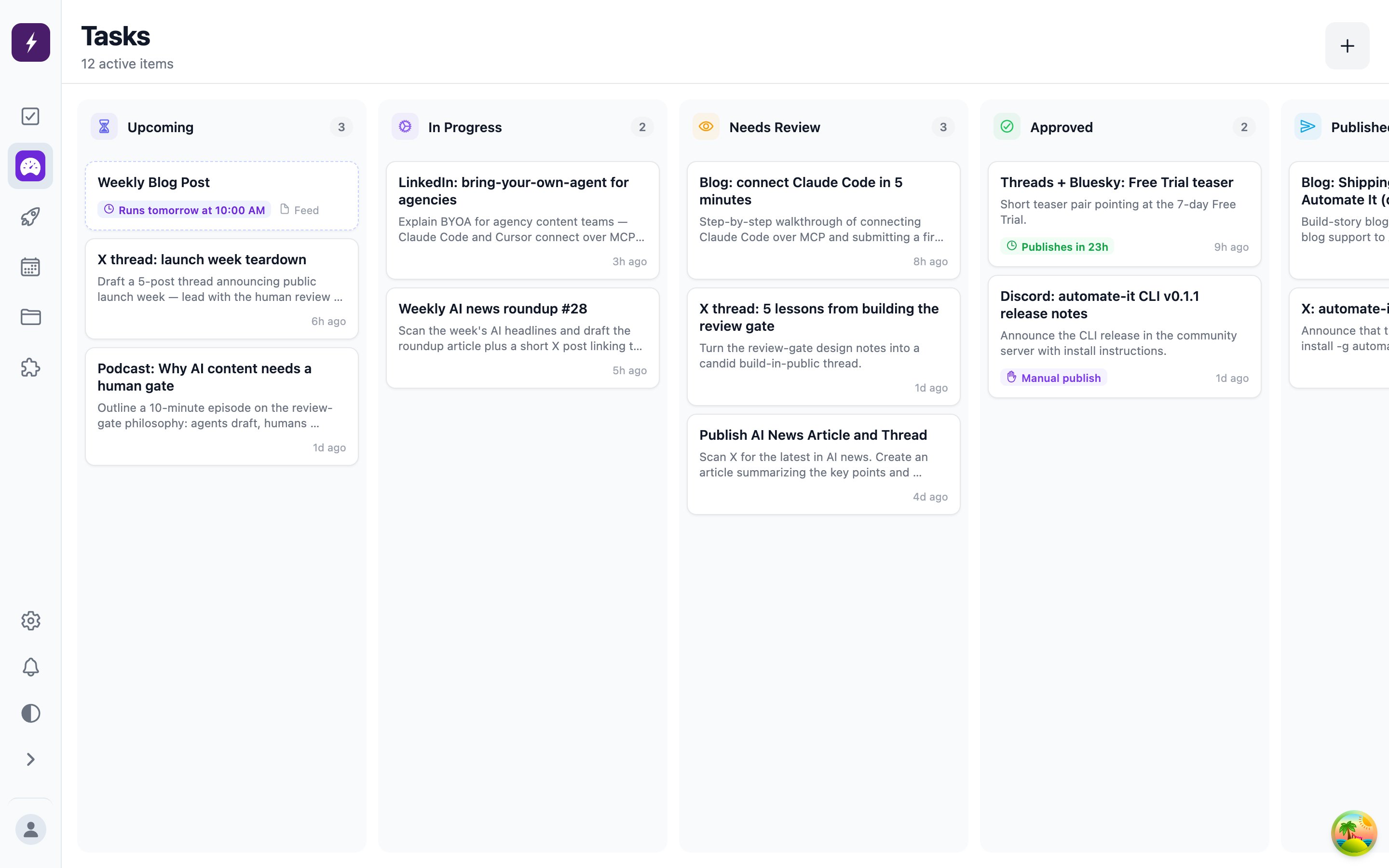 | Column | API status | Meaning |
| ------------ | -------------------------- | ------------------------------------------------------------------------ |
| Upcoming | `todo` | Queued tasks and upcoming automation runs |
| In Progress | `working` | A worker is drafting the content |
| Needs Review | `review` | Draft ready — waiting on a human in the [review queue](/workflow/review) |
| Approved | `approved` | Reviewed and accepted; publishes per its publish mode |
| Published | `publishing` → `published` | Posting now / live, with the post links recorded |
Tasks that hit an error show as `failed` and can be retried by an admin; deleted tasks are hidden, not destroyed.
## Who does the work
By default a new task is picked up by Automate It's **built-in worker**, which drafts the content with AI. A task can instead be assigned to a teammate — or claimed by an [external agent](/developers/overview) — in which case the built-in worker leaves it alone entirely.
## Task detail
Open any card to see:
* **Content items** — one per output type, editable before approval.
* **Comments** — the conversation between the worker and reviewers, including rejection feedback.
* **Activity** — a timeline of every status change, updating live while a worker runs.
Each rejection bumps the task's revision count, so you can see at a glance how many passes a piece took.
| Column | API status | Meaning |
| ------------ | -------------------------- | ------------------------------------------------------------------------ |
| Upcoming | `todo` | Queued tasks and upcoming automation runs |
| In Progress | `working` | A worker is drafting the content |
| Needs Review | `review` | Draft ready — waiting on a human in the [review queue](/workflow/review) |
| Approved | `approved` | Reviewed and accepted; publishes per its publish mode |
| Published | `publishing` → `published` | Posting now / live, with the post links recorded |
Tasks that hit an error show as `failed` and can be retried by an admin; deleted tasks are hidden, not destroyed.
## Who does the work
By default a new task is picked up by Automate It's **built-in worker**, which drafts the content with AI. A task can instead be assigned to a teammate — or claimed by an [external agent](/developers/overview) — in which case the built-in worker leaves it alone entirely.
## Task detail
Open any card to see:
* **Content items** — one per output type, editable before approval.
* **Comments** — the conversation between the worker and reviewers, including rejection feedback.
* **Activity** — a timeline of every status change, updating live while a worker runs.
Each rejection bumps the task's revision count, so you can see at a glance how many passes a piece took.